

3d
Gorgeous White EVO 3D released on September 9th Exclusively At RadioShack Posted by Hassan khalid in EVO 3D (Shooter), HTC, News
1:43 PMUpdate: If you've been holding your breath waiting for this beauty, you can breathe a sigh of relief, as it's now available at RadioShack. Woot.
Could the EVO 3D on Sprint get even better? Well, sure - it could use a bit of Ice Cream Sandwich, but we'll remain realistic for the time being and take RadioShack's exclusive white version instead. The new sleeker, more gorgeous than ever EVO 3D variant will be coming September 9th, as outed by a screenshot posted by RadioShack's own Twitter account. Lookin' good, isn't it?

Shortly after the HTC Sensation was released, we covered a seemingly random issue with the touchscreen. Not all Sensation owners experienced this issue, and it's still relatively unknown what the exact cause of the problem is.
However, one of the theories formed on XDA is that it's a grounding issue on some devices. On others, though, the issue seems to be completely software related. If you can easily solve the problem by rebooting or a factory reset, then the fix outlined below will not work for you. If, however, this doesn't remedy the problem - even temporarily - then you should continue reading.
Android Police will not be held responsible for any damage done to your device while attempting the below fix. Proceed at your own risk.
So, what's the issue?
The problem seems to lie with the grounding pin, which resides under the back cover. There are two relatively simple solutions that can correct the issue -- but again, it may not work for everyone. Let's have a look.
The Fixe(s)
Both fixes serve basically the same purpose, just offer different methods of achieving the end result. The first one involves pulling out a tiny metal pin on the device itself that sits just below the back cover:
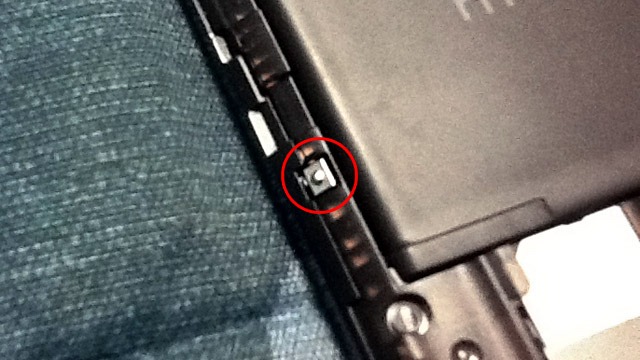
Once you locate the pin, simply slide something under it - a safety pin, small screwdriver, etc - andgently pull it out. Keep in mind this should be a very subtle movement, as you could easily break the pin. The goal is to have the pin come in contact with the opposing metal plate on the inside of the battery cover, thus alleviating the intermittent touchscreen issues.
Like I said, the second fix revolves around the same basic principal: to create a better connection between between the two components. This time, though, instead of working on the phone itself, you're going to be working with the battery cover.
Firstly, if you haven't already, remove the battery cover and find out the small metal plate:
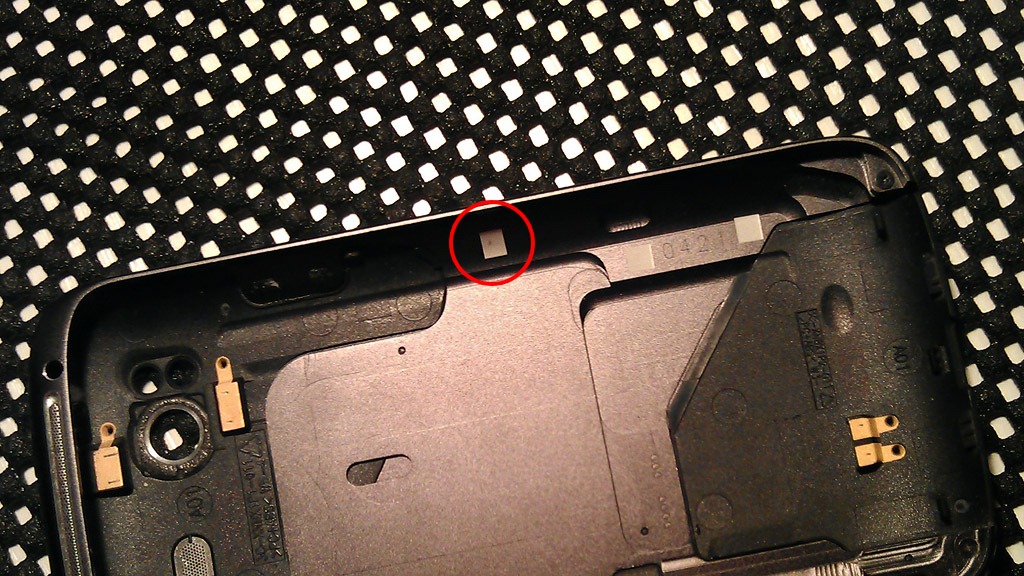
Got it? Great. Now, grab some aluminum foil and fold it over a fews times and place it on top of the square, ensuring good contact between the two. Once finished, carefully put the cover back on, making sure to leave the foil in place (or else it defats the purpose).
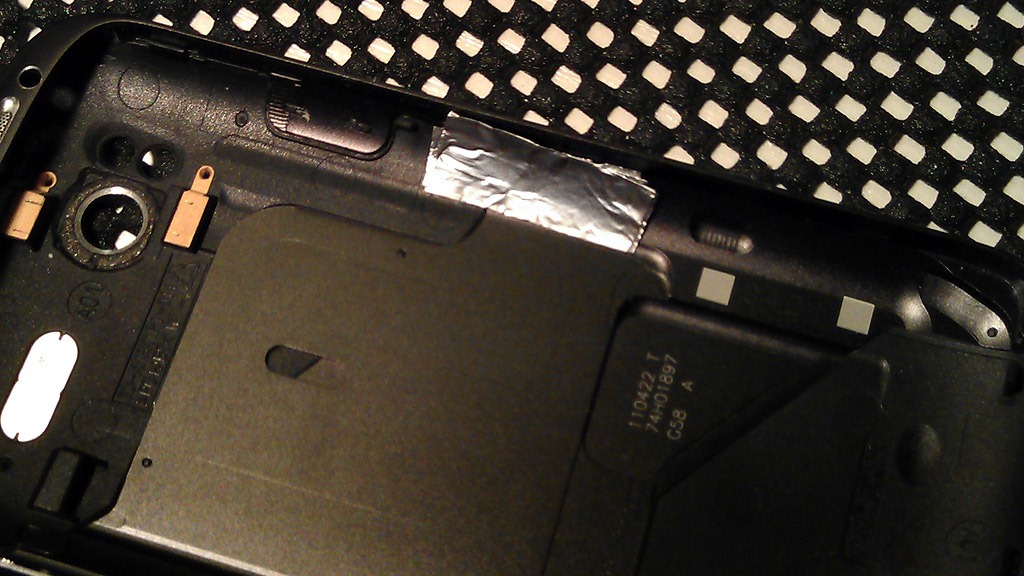
The second solution will work as a good trial run without having to physically alter the device in any way. Once you confirm that it works, you can then perform the other action if you choose. For a more permanent solution, you could drop a bit of solder on the square plate, also allowing for a better connection. This, however, is something that I wouldn't recommend, especially if you've never worked with solder before.

Considering just how similar the new HTC Desire is to the not-quite-as-new Google Nexus One (read:very, very similar), I wasn’t expecting to walk away from my hands on session with my mind too blown. I mean, it’s essentially just a Nexus One with HTC’s Sense UI and an optical trackpad, right?
Right – and that’s exactly why it’s amazing.
Now, a big part of the reason I was so impressed by the HTC Desire is because I haven’t spent time with a Nexus One in a few weeks – I’d forgotten just how great it feels in your hand and how speedy the entire operating system is on the 1Ghz Snapdragon chip. Both of those still ring completely true with the Desire; the build quality is rock solid, and HTC’s Sense just downright flies.
Notes and Impressions:
- As I mentioned in the Legend hands on, I walked away from my time with these handsets with far more confidence in the optical trackpad than I went in with. The transition was effortless.
- It looks just like the Nexus One – and that’s a good thing. The Nexus One is easily one of the best look Android handsets around – hell, it’s one of the best looking handsets around regardless of platform.
- We’ve heard a few reports of Sense being a bit buggy during demonstrations (it is, after all, a new build), but we didn’t see anything of the sort. Check it out in the video down below – a 1Ghz CPU, Sense, and a big ol’ high resolution screen is really just a perfect combination
- In addition to the jump from trackball to optical trackpad, the HTC Desire has physical, pressable buttons where as the Nexus One’s are all touch. I’m a sucker for physical buttons. I’d take the button layout over that of the Nexus One any day.
Should you hold out on buying a Nexus One in hopes that this is coming to the states? Probably not – HTC seemed pretty adamant that this model won’t be coming stateside. Should recent Nexus One owners feel chuffed? Nah – the Desire is better than the Nexus One on a few counts and seemingly worse on none, but the majority of its perks are at least somewhat trivial. The real, solid selling points here are almost entirely software-based. Once this thing’s released, I’d imagine it won’t be too long at all before Sense and all that comes with it gets hacked straight onto the Nexus One.

A phone that makes browsing, exhilarating
With its huge cinematic screen and high fidelity sound the HTC Desire HD gives you a breathtaking internet browsing experience. Websites, videos, music, games and apps at their dynamic best. Everything you like to play with, played safely thanks to HTC Sense security.
5 things that make the HTC Desire HD unique
We put a lot of love in every single product we create, all to make sure that every feature, from the smallest to the biggest, is designed around you and your needs.
- 1
Capturing the moment
Until recently if you wanted quality images and video you had to carry both a camera and your phone. Not anymore. We've added HD video recording and an 8MP, dual flash camera with built-in effects (it's like being able to swap lenses and Aadd filters on the fly). And we've made it a snap to share to YouTube or to your big screen TV via DLNA. - 2
Connected media for more viewing options
Tired of moving stuff from one device to another just to share your photos, videos and music on a bigger screen? Stream them all from your phone to your home theater system via DLNA. Gather the family around - it's show time! - 3
Always have a good read on hand
You may forget to take along your book, but, no problem, you've got your HTC Desire HD and its built-in library of classics. As you flip through the books, you can easily look up tons of info about what you're reading. Simply select the text and choose to search from Wikipedia, Google, YouTube or the dictionary. Want new books? Just download them! - 4
See more of the web with Flash®
What's the point of only being able to see part of the web? With built-in Adobe® Flash® Player support on your HTC Desire HD, no websites are out-of-bounds. And why wait for pages to load when you can view them in separate windows? A pinch and a tap lets you jump from one page to the next. - 5
Hear all about it
It's frustrating when you don't have the same content at home, in the office and when you're away from both. Problem sorted with the new News app on the HTC Desire HD which syncs with Google Reader. And wouldn't it be great if all it took to subscribe to a site's feed - and add it to all your readers - was just a simple tap on your HTC Desire HD web browser? Well, it is great!


Yesterday, HTC unleashed the HTC Sensation 4G along with the new services including HTC Watch videoservice and the latest customer-focused HTC Sense experience. T-Mobile USA will be accountable for sales of HTC Sensation 4G in United States and the device will be expected to go on sale in summer. The company has not disclosed the price of the device.

Some of the characteristic features of the device include a 4.3-inch qHD display (540 x 960 resolution), a 1.2GHz dual-core Qualcomm Snapdragon processor, 1GB of internal storage, an 8 megapixel rear lens with dual LED flash capable of 30FPS recording at max 1080p resolution with full stereo sound, and 768MB of RAM. The HSPA+ device help pushing the download rate to a maximum level of 14.4Mbps.
If we talk about its software specifications, it will come with Android 2.3 that is codenamed as Gingerbreadalong with scene 3.0. Apart from this, the new version of HTC Sense offers a customizable active lockscreen which means you can customize real-time information and content like social, photos, weather, or stock updates, an upgraded weather app and 3D transitions. HTC Watch, on the other hand, is a video service that allows the user to download movies of DVD-quality. This service was first introduced in HTC’s Flyer tablet. HTC Watch makes use of progressive download technology which enables the users to watch videos instantly without waiting for huge video to finish downloading first. Another important thing is you can either buy or rent videos as well. In case you buy the videos, you can watch them on five different HTC devices.
“Consumers have quickly transformed smartphones into consumer lifestyle hubs that are pocket- sized entertainment centers that enable people to take their favorite multimedia content with them wherever they go,” HTC CEO Peter Chou said in a statement. “The new HTC Watch service makes it fun and easy for people to access premium movies and TV shows while on the go. The HTC Sensation 4G combines this great multimedia experience within the latest HTC Sense experience in a premium device that delivers a powerful and unprecedented smartphone to our customers.